Category Archives: Magento

5 Signs Your Magento Developer Is Slowing Down Your Business

Your developer could be costing you far more than their monthly invoice.

Not because they’re making mistakes.

But because they’re slowing your business down in ways you may not even notice.

Every delayed update, every miscommunication, every missed opportunity adds up. Before long, you’re weeks—or even months—behind your competitors.

For fast-growing ecommerce businesses, momentum matters. And if your developer can’t keep pace with your business, your growth eventually stalls.

Here are five signs it may be time to rethink your development partnership.
5 Signs Your Magento Developer Is Slowing Down Your Business

1. They Don’t Move at the Speed of Your Business

Ecommerce doesn’t operate on a 9-to-5 schedule.

Customers shop around the clock.

Promotions launch on tight deadlines.

Website issues can cost sales every minute they’re unresolved.

Yet many businesses find themselves waiting days for a response to an urgent request.

If you’ve ever sent your developer a high-priority update and heard nothing back while sales continued slipping away, you know how frustrating—and expensive—that can be.

A great development partner understands that urgency matters. They don’t just respond eventually—they respond when your business needs them.

Your next product launch shouldn’t be waiting on someone’s inbox.

2. You Spend More Time Explaining Than Getting Results

Have you ever felt like you’re repeating the same instructions over and over?

That’s usually a sign that your developer understands the task—but not the business behind it.

Good developers ask questions.

Great developers ask questions that uncover the bigger picture.

They want to understand:

  • What you’re trying to accomplish
  • Why it matters
  • How it supports your long-term goals

When your developer understands both the technical requirements and the business objective, projects move faster and produce better results.

When they don’t, everyone loses time—and those extra hours often become billable.

3. They Build What You Ask—But Never Suggest Better Solutions

A developer shouldn’t simply take orders.

They should be a strategic partner.

If they’re never offering ideas, identifying potential problems, or suggesting better ways to accomplish your goals, you’re missing out on one of the biggest benefits of working with an experienced development team.

Your developer should be thinking ahead.

They should help you spot blind spots before they become expensive problems.

They should be looking at performance, security, scalability, and long-term growth—not just today’s task list.

One simple question can reveal a lot:

“What would you do if this were your business?”

A developer who thinks like a partner will almost always have valuable insights to share.

4. You Don’t Trust Them During Critical Moments

Imagine your website crashes during Black Friday.

Would your developer drop everything to help?

Or would you spend hours waiting for a reply while orders disappear?

The best development partners prove themselves during high-pressure situations.

They’re prepared.

They’re responsive.

And after the emergency is over, they don’t simply move on—they help prevent it from happening again.

That might include:

  • Stress testing your website before major sales events
  • Reviewing server capacity
  • Identifying weak points before they become costly outages
  • Building a long-term performance plan

Preventing problems is always better than reacting to them.

5. It Feels Like a One-Way Relationship

Technology is important.

But trust is even more important.

Your developer should feel like an extension of your team—not a vendor you constantly have to chase.

The best partnerships allow you to focus on growing your business while knowing someone else is watching over the technical side.

You should feel confident that:

  • Your website is being maintained properly.
  • Potential issues are being addressed proactively.
  • Someone is looking out for your business—not just completing tickets.

When you trust your developer, you have more time to focus on marketing, sales, customer experience, and growth.

Choosing the Right Developer Is About More Than Technical Skills

Many business owners assume switching developers is risky.

But staying with the wrong developer can be far more expensive.

If even one of these signs sounds familiar, it may be time to evaluate whether your current development partner is helping your business move forward—or quietly holding it back.

The right developer doesn’t simply build features.

They help your business grow.

They understand your goals.

And they become a trusted partner invested in your long-term success.

Don’t Let Your Developer Be the Bottleneck

Your website should support your business—not slow it down.

If your developer isn’t responsive, strategic, or proactive, every delay has the potential to cost you revenue and momentum.

Finding the right development partner isn’t just about getting better code—it’s about building a relationship with someone who understands your business and helps you scale with confidence.

Prefer to Watch Instead?

If you’d rather watch than read, check out the full YouTube video, 5 Signs Your Magento Developer Is Slowing Down Your Business.

In the video, we walk through each warning sign in more detail and explain what to look for in a development partner that supports your long-term growth.


Why Most Magento Developers Waste Your Budget

If your Magento store feels slow, you’re probably focused on the wrong solution.

Maybe you’ve been told to upgrade your server.

Maybe you’ve purchased another optimization extension.

Or perhaps you’ve hired a developer who promised to “speed everything up.”

Unfortunately, many Magento store owners spend thousands of dollars on fixes that never address the real problem.

The result?

A slower website, frustrated customers, and lost sales that happen quietly behind the scenes.

The good news is that there are proven ways to improve Magento performance—you just need to know where to focus.

Why Most Magento Developers Waste Your Budget

Slow Websites Cost More Than You Think

Every second your website takes to load affects the customer experience.

Visitors become impatient, product pages feel sluggish, and conversion rates begin to fall.

Many business owners don’t realize this is happening because nothing appears “broken.” The website still loads—it just loads slowly enough to drive customers away before they complete a purchase.

We’ve worked with Magento stores generating seven and even eight figures in annual revenue, and one thing we’ve learned is that much of the performance advice circulating online can actually make matters worse.

What Actually Improves Magento Performance?

Before spending money on expensive upgrades, make sure you’ve covered the fundamentals.

1. Configure Full Page Caching Correctly

One of the biggest performance improvements comes from properly configuring Varnish Full Page Cache.

Many stores technically have caching enabled, but it hasn’t been configured or tested correctly, leaving a significant amount of performance on the table.

2. Use a Content Delivery Network (CDN)

A CDN isn’t just about reducing file sizes.

It distributes your website’s static assets across multiple locations so visitors receive content from a server that’s geographically closer to them.

That means faster load times and a better shopping experience, regardless of where your customers are located.

3. Make Sure Production Mode Is Enabled

This one surprises many Magento store owners.

It’s not uncommon for websites to remain in Developer Mode long after development has been completed.

Developer Mode is useful during testing, but it significantly slows down a live website.

Switching to Production Mode can provide an immediate performance boost.

4. Optimize Your Images

Large, unoptimized images are one of the most common causes of slow ecommerce websites.

Using modern image formats like WebP and removing unused image files can dramatically reduce page load times without sacrificing quality.

5. Disable Unused Magento Modules

Many Magento stores continue running modules they no longer use.

Every unnecessary module adds overhead that can affect performance.

Cleaning up unused modules helps reduce complexity and improve speed.

Small Changes Can Produce Big Results

We’ve seen stores improve their page load times by two to three seconds simply by correcting caching and implementing a few foundational optimizations.

The impact wasn’t just a faster website.

Performance improved.

Customer experience improved.

And conversion rates followed.

The Magento “Fixes” That Often Waste Your Budget

Here’s where many businesses end up spending money unnecessarily.

They’re told they need:

  • A bigger server
  • Another optimization extension
  • More performance plugins

The problem is that none of these solutions fix poor website architecture.

A larger server doesn’t solve inefficient code.

Optimization extensions often mask symptoms instead of eliminating the underlying issue.

And many performance plugins simply act like temporary bandages rather than permanent solutions.

Beautiful Themes Can Hide Serious Problems

A website can look incredible on the surface while performing terribly underneath.

Many premium Magento themes include excessive code, features, and functionality that most businesses never use.

That extra code creates unnecessary overhead, slowing down your website every time someone visits it.

A visually impressive website isn’t enough if customers leave before the page finishes loading.

Why the Right Magento Developer Matters

Magento performance isn’t just about the platform.

It’s about the person managing it.

We’ve worked with stores that had already been “optimized” by another agency.

They had quality hosting.

They had caching enabled.

On paper, everything looked correct.

Yet the website was still slow.

After reviewing the server, we discovered the hardware wasn’t the issue at all.

The caching configuration simply wasn’t tuned for real-world traffic.

Once the configuration was corrected, performance improved without changing the server.

That’s why it’s important to work with someone who understands both Magento and server performance.

A developer who only understands Magento may blame the server.

A server administrator who doesn’t understand Magento may miss application-level issues.

The best results come from understanding how both work together.

Don’t Spend More Until You Know the Real Problem

If your Magento website is underperforming, resist the temptation to throw more money at bigger servers or additional extensions.

Start by evaluating your caching, CDN configuration, production mode, image optimization, and unused modules.

Then make sure you’re working with a developer who understands both Magento and the infrastructure that powers it.

The right fixes can dramatically improve your website’s speed—and your conversion rates—without unnecessary spending.

Prefer to Watch Instead?

If you’d rather watch than read, check out the full YouTube video, Why Most Magento Developers Waste Your Budget.

In the video, we break down the biggest Magento performance mistakes, explain why so many developers recommend expensive fixes that don’t work, and show you where to focus if you want a faster, higher-converting ecommerce store.

👉 Watch the full video: Why Most Magento Developers Waste Your Budget

Which Shopping Cart is Right for You?

Which cart is right for you?


Picking the correct shopping cart for your business can be a daunting task! Especially with the number of eCommerce shopping carts available on the market today! We have customers ask us many times what shopping cart is best, especially given we have been working with and customizing shopping carts since 2002.

Just like there is no correct answer to the perfect car for everyone, there is no perfect shopping cart. It really depends on the features you want, how easy it is to maintain, how reliable it is, and how much you are able to pay.

We will be discussing the 2 shopping carts we work with most, X-cart and Magento.

Start by listing in order what is most important in an eCommerce shopping cart to you

  • Built-in Features
  • Shopping Cart Cost
  • Maintenance costs
  • Hosting Costs
  • Developers available
  • Flexibility

Magento eCommerce Attributes

Magento for example, is a very flexible shopping cart with a large set of built in features. You can even get a free version of this shopping cart. There are a very large number of developers available to help you with MagentoCommerce, including us.

However, Magento requires a much more robust server to run on than most shopping carts. Our eCommerce Hosting for Magento requires a lot larger server base. You would need at least the Medium level of hosting to properly run Magento, but more likely need the Large hosting server or above depending on how much traffic you expect to your shopping cart.

Magento can also be extremely expensive for most businesses if you wish to run the paid version of it and is much more difficult to maintain by the average store owner. You’re very likely to need a Magento Developer to help you out.

X-cart eCommerce Attributes

X-cart has been around since 2001 and has become quite the feature-rich shopping cart. Especially the long running X-cart 4 version and X-cart 5 is working on catching up. X-cart can run on a much smaller server than Magento. Our eCommerce Hosting packages for X-cart can utilize our Small Server base for many businesses and can easily expand into the larger servers as needed.

X-cart 4 and 5 are much easier for the average business owner to maintain for most day-to-day tasks and has several options for X-cart Developers including us. Some business owners we’ve seen be able to pick up some small and medium customizations as well!

For more complicated customizations, you will need an X-cart Developer to help you out.

Picking the Right eCommerce Package

Still not sure which one would work best for you? Start by listing out what features you need, and Contact us! We will be happy to help you walk through critical thinking to help you pick the product that’s best for you!

Magento 2.3 Released

Magento 2.3 Released!

Magento 2.3: Multi-source Inventory, Progressive Web Apps (PWA) support, and more!

The long awaited release of both the Magento Commerce and Open Source editions is available now at Magento.com.

Mobile Experience

Firstly, the Progressive Web Applications (PWA) Studio enables merchants to deliver their mobile store in an all-new app-like experience on modern, compatible devices. The new experience is faster and more responsive than traditional mobile skins, therefore improving conversions and sales across mobile channels.

Better Inventory

In addition to an improved mobile experience, the new Multi Source Inventory improves your supply chain management. The new system lets merchants manage inventory located in physically distinct warehouses and source channels in a single interface. Track inventory per source location and globally so that you can now know what quantity you have and where it’s located in your supply chain!

New Design Features

PageBuilder is an all-new drag-and-drop editing tool for site content. This new tool will help store operators update the look-and-feel of their site without having to hire a developer. In addition, this new tool uses a flexible grid-system, so that you can make new pages or tweak existing pages, without worrying about placement issues.

Other Changes

  • New options for shipping and order fulfillment.
  • A new declarative database schema; making life easier for developers.
  • Improved performance indexing site content,
  • Lastly, better security with update reCAPTCHA and Two Factor Authentication (2FA) options.

You can see the full list of changes by accessing the release notes for Magento Commerce and Magento Open Source, respectively.

For assistance upgrade, or to discuss how the new features of the Magento platform can aid your store, contact BCS Engineering today!

Magento 1 to be Supported Through 2020

Magento 1 long-term support through June 2020

Magento announced today a long-term strategy for the Magento franchise.

According to the post:

For Magento Commerce 1, we are providing software support through June 2020. Depending on your version, software support may include both quality fixes and security patches. Please review our Magento Software Lifecycle Policy to see how your version of Magento Commerce 1 is supported.
(Source)

and regarding the open-source edition (formerly known as the Community Edition):

For Magento Open Source 1, we are providing software security patches through June 2020 to ensure those sites remain secure and compliant. Please visit our Legal Terms page and review our Magento Open Source Software Maintenance Policy to see which versions of Magento Open Source 1 continue to receive software security maintenance.
(Source)

Therefore, it is of vital importance that e-commerce stores who are currently using Magento 1 begin the process of transitioning. This could be either via an upgrade to Magento 2, or via migration to another cart provider.

Need to Upgrade from Magento 1 to Magento 2?

At BCS Engineering, our e-Commerce focus is customer-centric. Our aim is provide you with the simplest path from where you are to where you need to be. If you’re currently hosting a Magento 1 e-commerce website, our Magento experts can assist you in multiple ways:

  • We’ll move your store from Magento 1 to Magento 2 — or any other platform — for you; let us do it all!
  • Do you just need some custom functionality ported to your new store? Our certified developers are ready to help.
  • Or, are you so completely overwhelmed with the idea of moving your store that you don’t even know where to begin? Don’t worry, we’ve been doing this since 2002… this isn’t our first rodeo.

Contact BCS Engineering today! We can help you navigate the upgrade process and keep your store working smooth… until 2020 and beyond!

Magento 2.2.6 Released!

The latest release of Magento — version 2.2.6 — is out now and includes multiple bug fixes. New enhancements designed to increase the overall security of the platform include:
  • 25 critical security fixes (addressing cross-site scripting and other vulnerabilities)
  • 7 major performance improvements (including product indexing and improvements for multi-site)
  • Updated Amazon Pay, Google Tag Manager, and dotmailer integrations
  • Over 150 product quality enhancements

Further notable enhancements include:

  • improved reliability of the checkout process,
  • CAPTCHA improvements, and
  • sales/payments improvements (including Braintree and Paypal integrations).

There are multiple other enhancements to improvements in shipping, sitemap, themes, as well as minor code and interface corrections. You can find the complete list of changes in the release notes for 2.2.6 Open Source or 2.2.6 Commerce. From Magento:

Although this release includes these security enhancements, no confirmed attacks related to these issues have occurred to date.

A minor patch is also available for Magento 2.1 — version 2.1.15 — that addresses these security concerns. For a full discussion of the vulnerabilities that have been addressed, see this discussion at the Security Center.

Do You Need Help with Your Magento Upgrade?

BCS Engineering’s certified Magento developers are standing by and ready to assist your e-commerce store with upgrading to the latest version of Magento! Our team are experts at deploying new major and minor upgrades, as well as assisting with your store’s theme, adding custom features to your store, or addressing security and performance issues. Contact us to find out how we can help with your store today!

Securing Magento 101: The Basics

Securing Magento

“It takes 20 years to build a reputation and five minutes to ruin it.”

— Warren Buffett

In the age of e-commerce that five minutes could be considerably shorter. Your e-Commerce business hinges upon your customer’s trusting your site completely.

With an install base of nearly 100,000 live websites, and a market share that’s surpassed 13%, Magento sites around the globe represent a huge target for malicious actors looking to compromise a sites for profit.

Just last week, a “massive website hacking campaign that has infected 7,339 Magento stores” was announced. Would you want to be one of those site owners? Would you want to explain to your customers that their credit card info was stolen.

Nope.

That’s why securing Magento is an absolutely critical step for your e-commerce business.

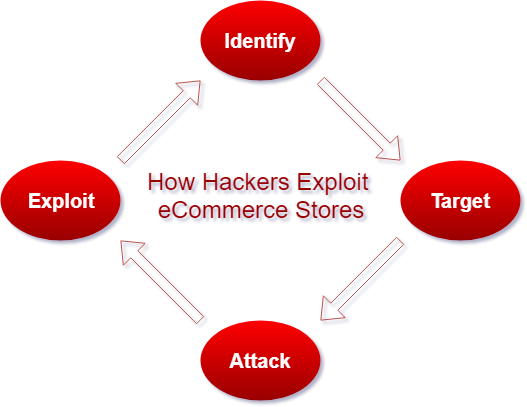
Typically the way that hackers compromise a Magento site is a cyclical process. It looks something like this:

The four stages of an eCommerce attack; you need to understand this process in order for effectively securing Magento.

  1. Identify a specific vulnerability in the e-commerce platform (Magento).
  2. Target an e-commerce store with this vulnerability.
  3. Attack the store with this vulnerability.
  4. Exploit the vulnerability until it’s found and patched; then repeat.

So our goal is simple… we prevent the cycle show above from ever starting. Here are some super-simple basic rules that every Magento site-operation should follow.


Ten Tips for Securing Magento

1. Regularly Apply Patches

Patches remove security holes regularly, and provide critical improvements to your Magento store that can prevent holes from being found by forcing a “moving target.”

2. Use Modules/Extensions from Authentic Sources

One of the reasons that your probably chose Magento was it’s sensibility and the large number of modules and extensions available for the platform. Make sure you only install modules and extensions from Magento Marketplace. You should also investigate the background of a module’s developer, and thoroughly read the module’s reviews, before you trust installing it to your store.

3. Change Passwords Before and After you Seek Any External Assistance

Any time you ask a developer to work on your store — even us — you’ll need to share credentials with them. You should always provide the minimal set of credentials needed for the work. This usually amounts to a Magento admin username and password. The proper way to do this is to make a new administrator account for the developer, with a random password, and once they have finished the work they set out to do you should disable that account and/or change that account’s password. In some circumstances, they’ll need SSH access, and the same principle holds there… disable that SSH user account and/or change the account’s password.

Bonus tip: restrict only certain IP addresses from connecting to your store via SSH, and use a non-standard TCP port number for added security. Your hosting provider can assist you with configuring this aspect.

4. Schedule a Recurring Security Review

We highly recommended not becoming complacent about securing Magento; that is, just because you’re safe today doesn’t mean you’re safe tomorrow. With that in mind you aren’t a security expert, either, so it makes sense to have an independent review of your store regularly to ensure that everything is working smoothly and, most important, securely.

Schedule a recurring security review of the Magento e-commerce store with a certified Magento developer to ensure that your store is always as safe as it can be.

5. Use SSL/HTTPS

SSL is to encrypts all data that passes between browsers and servers; this ensures that a third-party can’t view or manipulate the data as it passes from the user to the server. It’s absolutely essential to securing your store and is a strict requirement for PCI compliance.

6. Use SFTP

SFTP uses encryption to upload data to your Magento store. Like SSL/HTTPS, using SFTP prevents third parties from intercepting or manipulating data that you upload to your store.

7. Change the Administrative URL, Username and Password

One of the commonly exploited vulnerabilities across web is using default administrative URLs and credentials. You’re in a hurry to get your store up-and-running, you don’t have a good way to store a password, so you just leave things set to the default. Making just a few small changes — setting the admin URL to something that only you know, specifying a robust admin username, and using a secure password — can change your store from a soft target to a hard target instantly.

8. Consider Using a WAF for Added Security

A Web Application Firewall (WAF) works differently than a traditional firewall. A “regular” firewall typically only looks at network traffic at a very low-level; for example, to allow TCP port 80 (web traffic), or deny TCP port 22 (SSH traffic).

A WAF works at the layer closest to the user, looking at the actual HTTP requests, and can be used to block attempts at injecting SQL, preventing Cross-Site Scripting (XSS), and other complex attacks that no traditional firewall would ever detect.

Therefore WAFs assist in securing Magento by providing an added layer of protection to your threat reduction model and could very easily save your business someday.

10. Have a Disaster Recovery and Backup Plan in Place

An often unrecognized aspect of securing Magento is knowing what to do when something goes wrong. Think about how you would recover from a hack before it happens and have a plan in place. You’ll react quicker when you discover a problem, and won’t have to worry about what to do; just follow the plan and solve the problem. Having a good backup strategy, talking through with a developer what to do if you discover a problem, and staying calm because you have a plan can mean the difference between your site being down for a few hours and a few days.

Time spent preparing now will work out in the long run to be much less expensive than the lost revenue of an extending downtime event.


Conclusion

Because Magento is a robust platform, it has many safeguards to keep your e-Commerce store safe, but no piece of software is ever 100% invulnerable. The best thing that you can do is to implement a security-first mindset, follow expert advice on securing Magento, and never hesitate to ask questions about what’s best for your e-Commerce environment.

If you’d like to discuss your Magento store’s security, contact BCS Engineering: our professional, Magento-certified staff can assist you with improving your site’s speed and security today!

GDPR Support for Magento

GDPR Magento Support

BCS Engineering is fully capable of helping you with your Magento GDPR Compliance. We can implement and analyze your Magento applications to help you achieve compliance & assist you with any other issues that you might have regarding GDPR. We are offering a 4 Hour Magento Support Consultation which includes a phone discussion to understand your business processes.  We will then use that information to look into your Magento site and propose changes that we recognize & provide a time estimate to achieve those changes.  If there is time remaining in the 4 hour consult after completing the above tasks, we will use that remaining time to start implementing the changes that we identify to your Magento site.

We will base our work off of current best practices regarding GDPR & do our best at that point in time to help you achieve compliance.  However, we do want our clients to understand that these regulations are a moving target & constantly changing.  We encourage you to review all services and contracts connected to third-party companies with your legal counsel, in order to confirm GDPR compliance.

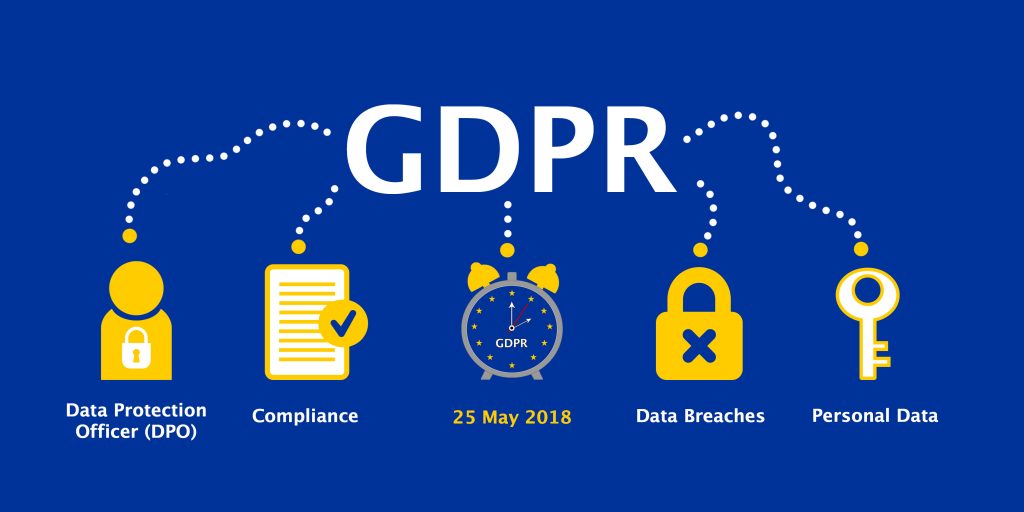
GDPR changes go into effect on 5/25/2018. Contact us for a quote to help you with your specific needs!

Magento Sites Targeted by Hackers

Has your Magento Site Been Hacked?

Researchers at Flashpoint have discovered that at least 1,000 sites running Magento have been compromised by brute force attacks to scrape credit card numbers and install malware that mines cryptocurrency. The Magento sites are being compromised through brute-force attacks using common and known default Magento credentials. These attacks occur when admins fail to change the credentials upon installation of the platform. Attackers can then build simple, automated scripts loaded with known credentials to facilitate access of the panels.

Once the hacker has access, they are able to install any script that they choose.  With this attack they are inserting malicious code in the Magento core file, allowing them access to pages where payment data is processed. POST requests to the server containing sensitive data are then intercepted and redirected to the attacker. Furthermore, the compromised sites will then return a fake adobe flash file which will install malicious malware on the victim’s computer.

If you think your site has been hacked or would like assistance with your site, please contact us!  We are happy to help you secure your site. You can read more detail about these attacks in this Flashpoint Blog.

Authorize.net Eliminates $49 Setup Fee!


Say Goodbye to the $49 Setup Fee

Effective April 19, 2018 Authorize.net will be removing the $49 fee for all newly created Authorize.net Payment Gateway Accounts!  If you’re thinking of switching or need a payment processor, Authorize.net just made their deal a whole lot sweeter.  You can obtain this special pricing by using this link

We can help you with your set up or answer any questions that you might have.  Contact us today for any assistance that you might need!

We also offer modules to assist you in implementing this payment processor for your shopping cart:

Magento Authorize.net CIM Module

X-Cart Authorize.net DPM Module

We cannot stress the importance of PCI Compliance & your shopping cart enough and this is a wonderful opportunity for you to take the steps to make sure your site is as secure as possible. We’ve been helping clients secure their sites and maintain PCI compliance since 2002 and can make this transition smooth for you.  Contact us today!